Make booking easier for clients
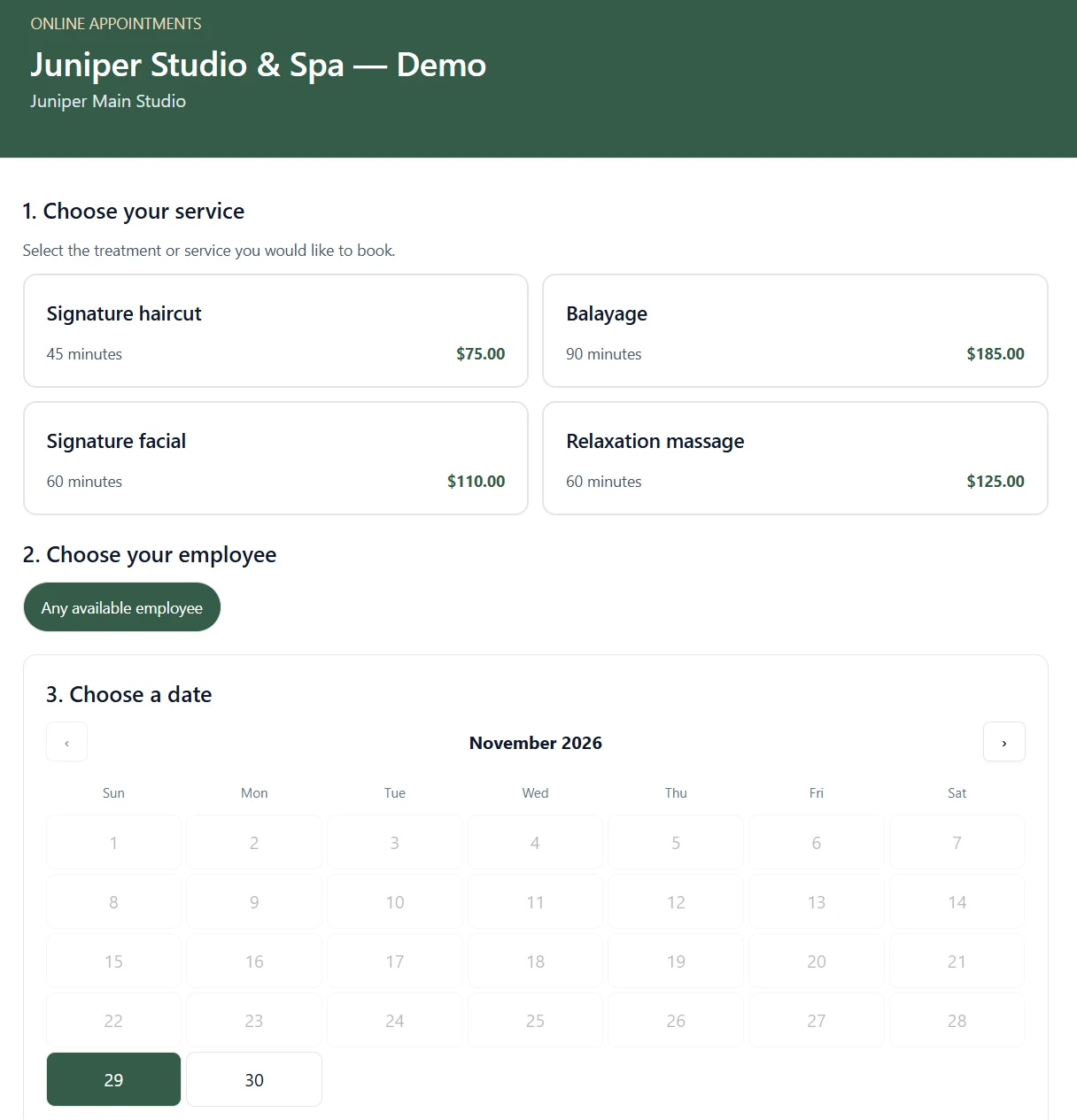
Share a dedicated booking link so clients can find a service, choose an available provider and book a time.
Salons, spas & barbers
Give clients a way to book and give your team a clear view of appointments, availability and client details.

In your Finn360™ workspace
Let clients choose available appointment times and services.
Manage service providers and availability together.
Keep appointment history and customer details handy.
 + Enlarge preview
The benefits
Share a dedicated booking link so clients can find a service, choose an available provider and book a time.
Set service availability by employee, manage closed times and review the schedule for each provider.
Use customer records to review appointments and keep client contact information together.
FinnPhone™ can answer calls and capture messages while the team serves clients. You can also review team time, estimates or invoices when those tools fit your business.
Putting Finn360™ to work
See how to set up the tools and what to watch as your team starts using them.
Start with your most requested services, set realistic appointment lengths, and enter each provider’s availability. Clients can book on their own and staff can spend less time coordinating times by phone.
What to track appointments booked through the link and calls that are purely about availability.
Use the calendar to spot openings and check client history when following up. Give returning clients a clear next booking option.
What to track occupied appointment hours and the share of clients who schedule another visit.
Configure FinnPhone™ to capture messages and route calls when appropriate. The front desk can return calls between appointments and follow up on booking inquiries.
What to track calls captured while staff are with clients and how many become appointments.
Configure services, providers and availability so clients can choose from the options you offer.
Your branded online booking page is available without interrupting a treatment. FinnPhone™ can also handle supported phone booking requests.
Yes. Organize recurring appointments for customers who return regularly.
Set closed periods and employee availability so customers see the times you intend to offer.
Make booking convenient and capture inquiries during busy periods, then review open slots and follow up with clients.
A day in your business
Let customers choose services and available staff through your branded booking page. Organize repeat visits and review client history before the next appointment.
Answer calls, capture opportunities and route requests while your team is busy.
Explore FinnPhone™ →Your own branded booking experience, with services, staff and availability in Finn360.
Explore Online booking →Keep contact details, activity and correspondence together for better follow-up.
Explore Customer management →Tell us how you work and what you want to simplify.